
tutorial que les prometi para descargar del famoso servidor ifolder (Observa las imagenes, un clic para hacerlas grandes o al texto)
Paso 1:
Descarga Flashget...
Paso 2:
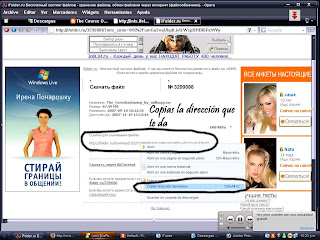
Abre tu link ifolder y dale un clic tal como muestra la imagen
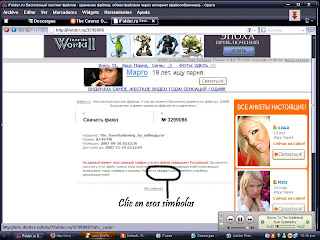
Paso 3:
Despues de abrir el primer link abre el segundo (cualquiera sirve) tal como muestra la imagen
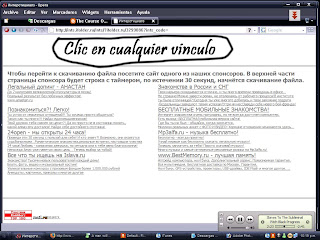
Paso 4:
Espera el tiempo que te marca y obtendras un link, tal como muestra la imagen
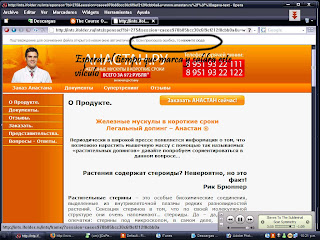
Paso 5:
Introduce el codigo de acceso...
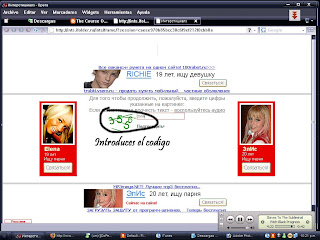
Paso 6:
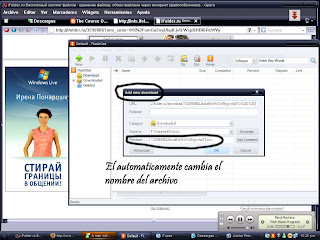
Copia el link de descarga y pegalo en el flashget, tal como dice la imagen
Despues...
y...
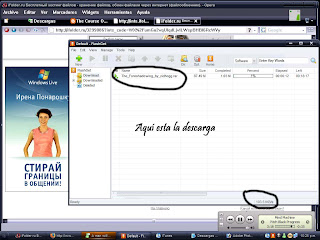
Lo ven complicado? espero les ayude... suerte.
Short manual for foreigners
How to download files from iFolder.ru
If you want to upload files, use english language oriented host -
AxiFile.com Rapideshare.de or Megaupload.com (u-r-g-h, I really HATE Megaupload - it discriminates foreign users)
iFolder User Agreement (The most important + my comments)
1. ifolder.ru is intended for an exchange and storage of files
2. ifolder.ru allows to any user free of charge:
2.1 Upload file up to 100 MB (file >100 MB may be uploaded only for price)
2.2 Download file (any size)
2.3 Set a password for file downloading
...
4. It is forbidden to place materials contradicting with Russian Federation Laws
5. It is forbidden to use iFolder file links in smap dispatches. That files will be deleted without warning.
...
6.1 File can't be downloaded from foreign IP more often, than from russian IP (exception - first 10 downloads)
6.2 Simultaneously the file can download no more than from 10 IP
6.3. Limit to downloads of one file from one IP - 50 (it has matter for some local network
(one static IP for many dynamic IP) and if you use proxy-server).
Downloading from iFolder:
Paste full link (for example http://www.ifolder.ru/163496) in your browser.
Enter security code (green) in a field and then click a word ДАЛЕЕ

Click your personal link (can't share this link, it's valid only for your IP)

Select folder and filename - and you can start download. That's all.
If you are restricted according to Rule 6.1, you should be
1. Use russian proxy-server (may be problems - see rule 6.3 and/or low speed of downloading)
2. Visit one of iFolder sponsor sites (for Example Job.ru) during >30 sec.
P. 2 is also solution, if date of storage has expired, but file is still on host.
Paso 1:
Descarga Flashget...
Paso 2:
Abre tu link ifolder y dale un clic tal como muestra la imagen

Paso 3:
Despues de abrir el primer link abre el segundo (cualquiera sirve) tal como muestra la imagen

Paso 4:
Espera el tiempo que te marca y obtendras un link, tal como muestra la imagen

Paso 5:
Introduce el codigo de acceso...

Paso 6:
Copia el link de descarga y pegalo en el flashget, tal como dice la imagen

Despues...

y...

Lo ven complicado? espero les ayude... suerte.
Short manual for foreigners
How to download files from iFolder.ru
If you want to upload files, use english language oriented host -
AxiFile.com Rapideshare.de or Megaupload.com (u-r-g-h, I really HATE Megaupload -
it discriminates foreign users)iFolder User Agreement (The most important + my comments)
1. ifolder.ru is intended for an exchange and storage of files
2. ifolder.ru allows to any user free of charge:
2.1 Upload file up to 100 MB (file >100 MB may be uploaded only for price)
2.2 Download file (any size)
2.3 Set a password for file downloading
...
4. It is forbidden to place materials contradicting with Russian Federation Laws
5. It is forbidden to use iFolder file links in smap dispatches. That files will be deleted without warning.
...
6.1 File can't be downloaded from foreign IP more often, than from russian IP (exception - first 10 downloads)
6.2 Simultaneously the file can download no more than from 10 IP
6.3. Limit to downloads of one file from one IP - 50 (it has matter for some local network
(one static IP for many dynamic IP) and if you use proxy-server).
Downloading from iFolder:
Paste full link (for example http://www.ifolder.ru/163496) in your browser.
Enter security code (green) in a field and then click a word ДАЛЕЕ
Click your personal link (can't share this link, it's valid only for your IP)
Select folder and filename - and you can start download. That's all.
If you are restricted according to Rule 6.1, you should be
1. Use russian proxy-server (may be problems - see rule 6.3 and/or low speed of downloading)
2. Visit one of iFolder sponsor sites (for Example Job.ru) during >30 sec.
P. 2 is also solution, if date of storage has expired, but file is still on host.


2 comentarios:
what the password??
hermes bags is recognized for its handmade items, like Hermes Ostrich . Only one craftsman is allowed to work on a handbag at a time, instead of a production line where everything is made by machines. Because of the labor work that Hermes Crocodile maintains in his items, one bag can take 16 to 24 hours to make, because they use such a rare bunch of materials, sometimes which can be exotic items such as expensive metals.
lida helps to loose weight. Presently there are a lot of weights beating techniques which are accessible in the marketplace.. People may even ensure about diverse organizations which provide you with the weight beating techniques. lida daidaihua is one of organizations which provide people with lots of weight reduce steps and tips. One of such web site which provides daidaihua products is lose weight with. lida slimming has got a special type of packing inside in order to make customers differentiate between their products. If some one needs to identify regarding the slimming capsule beating techniques and devices, then they can verify from our site of slimming capsules .
In fact, there are only a handful of these around the world. Secondly, buying your Chanel Wallet from an official boutique often means you have to pay the highest prices as you not only pay for the quality of the product, the prices also feature premiums as a result of the brand name. Another point to note is that Chanel handbags often only carry the latest designs in their inventories, as it is with fashion stores that aim to be at the forefront of demand and brand leadership. What this all means is that if you intend to buy replica Chanel handbags from Chanel handbag , be prepared to pay sky high prices and face limited choices.
uk Tiffany , Heart Pendant in sterling silver, silver necklaces size is small, on a chain. The design is very simple which the tradition heart shape presenting love is. Classical, traditional and fashionable, silver pendants gives a new visual attracting and silver bracelets gives us a sense of purity, showing the noble and elegant.
Publicar un comentario